How GitHub’s two Advanced Security products, wired into GitHub Actions and pull requests, stop leaked credentials and vulnerable code before they reach production.
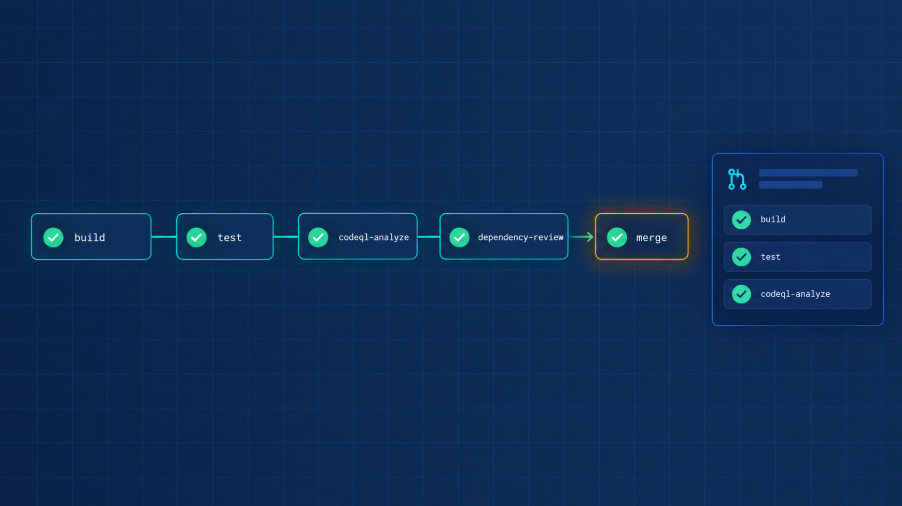
Software development is moving faster than ever. CI/CD pipelines are highly automated, pull requests can move from review to merge in minutes, and AI assistants are accelerating how code is written and delivered. Security needs to operate at the same speed. If security controls arrive too late, they risk becoming a bottleneck that developers work around rather than an integral part of the development process.
This is exactly the challenge GitHub Advanced Security is designed to address, bringing security directly into the developer workflow through two focused products: GitHub Secret Protection and GitHub Code Security.
In this post we look at what each product does, why the split matters for how you plan your DevSecOps workflow, how to run the checks in GitHub Actions, and how to get started without disrupting the way your developers already work.
Why this matters now
Leaked credentials remain one of the most common and most avoidable causes of a breach. A single API key committed to a repository can give an attacker direct access to cloud resources, databases or third-party services. GitHub’s own figures show the scale of the problem: according to GitHub, Secret Protection detected 39 million secret leaks in 2024 and prevented 4.4 million secrets from leaking on the platform in the same year.
Vulnerable code is the other half of the picture. Static analysis findings that sit in a backlog for months are a risk in their own right, and the gap between detection and remediation is where security debt accumulates. GitHub’s message for Code Security sums up the goal neatly: security should be built in, not bolted on.
Where GHAS fits in a secure development lifecycle
Microsoft’s Security Development Lifecycle (SDL) guidance points to GitHub Advanced Security (GHAS) as a practical way to protect the integrity of code throughout development. The SDL view starts with a baseline that every GitHub plan already includes. The dependency graph identifies all of a project’s dependencies, the ecosystems and packages it relies on, and the repositories and packages that depend on it, with licence information and vulnerability severity for each. Dependabot alerts then notify you when your code relies on a package with known vulnerabilities and can even open pull requests that update it. As the SDL guidance puts it, relying on a vulnerable package can make your system an easy target for attackers.
GHAS adds a further layer of security features on top of that baseline. It is available for enterprise accounts on GitHub Enterprise Cloud and GitHub Enterprise Server. Most GHAS features are free for public repositories on GitHub.com, while private repositories need a GHAS licence.
The SDL guidance summarises the GHAS feature set as shown below. Today GitHub sells these capabilities as two products, GitHub Secret Protection and GitHub Code Security, which the rest of this post covers in turn.
| GHAS feature | What it does |
|---|---|
| Code scanning | Uses CodeQL or a third-party tool to find potential security vulnerabilities and coding errors in your code |
| CodeQL CLI | Runs CodeQL locally on software projects, or generates code scanning results to upload to GitHub |
| Secret scanning | Detects secrets such as keys and tokens that have been checked into private repositories |
| Custom auto-triage rules | Manage Dependabot alerts at scale by choosing which alerts to ignore, snooze or turn into a Dependabot security update |
| Dependency review | Shows the full impact of dependency changes and any vulnerable versions before a pull request is merged |
GitHub Secret Protection: keep your secrets secret
Secret Protection continuously monitors your GitHub estate for exposed credentials and, more importantly, stops them from getting there in the first place. Its core capabilities are worth understanding one by one.
DevSecOps pipeline protected by GitHub Advanced Security
Push protection: block leaks before they happen
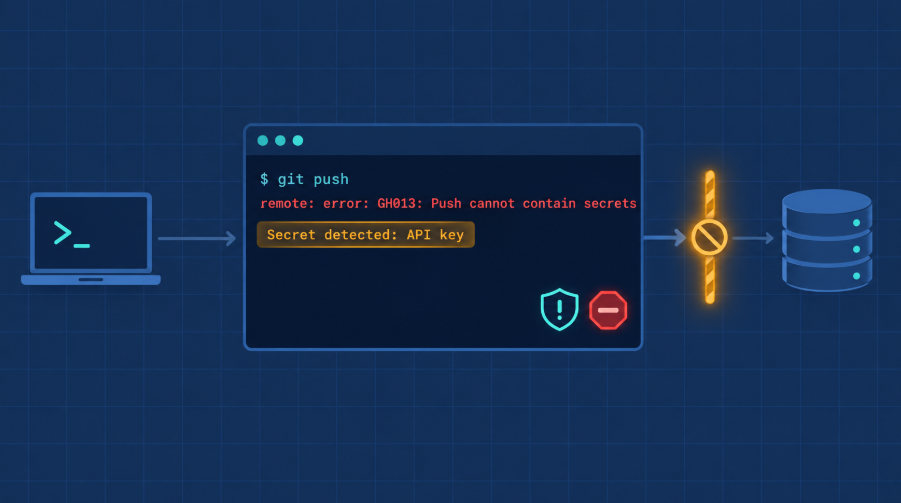
Push protection scans code during the push itself and blocks the push if it detects a secret or token. The credential never lands in the repository, so there is nothing to clean out of the Git history and nothing to rotate in a hurry. Because the check happens inside the normal Git workflow, developers get immediate feedback without a separate tool or portal.
For organisations that need governance around exceptions, delegated bypass adds an approval step. A developer who wants to push past a block must submit a request to a designated group of reviewers, so a risky secret cannot slip through on one person’s judgement alone.
Secret scanning beyond the code
Secrets do not only leak through source files. Secret scanning also looks in issues, discussions and other content where credentials are often pasted while troubleshooting. Each alert is enriched with metadata such as validity checks, which confirm whether a detected secret is still active, and public leak indicators. That lets security teams focus first on the credentials that can actually be abused today.
AI-assisted detection and a partner ecosystem
Pattern-based detectors are good at finding structured tokens, but generic passwords are much harder to catch. Secret Protection uses GitHub Copilot to find these elusive secrets, adding a layer that traditional detectors are less likely to cover, while keeping false positives low.
Through the secret scanning partner program, GitHub works with more than 150 service providers. When a partner’s token is found in a public repository or npm package, GitHub alerts the provider directly so it can validate and act on the leak, which speeds up revocation and rotation for everyone.
GitHub Code Security: where found means fixed
Code Security brings static analysis, dependency scanning and AI-powered remediation into the same GitHub workflow developers already use. The aim is not just to find more issues but to close them faster.
Push protection blocking a secret before it reaches the repository
CodeQL: automated security checks that follow the data
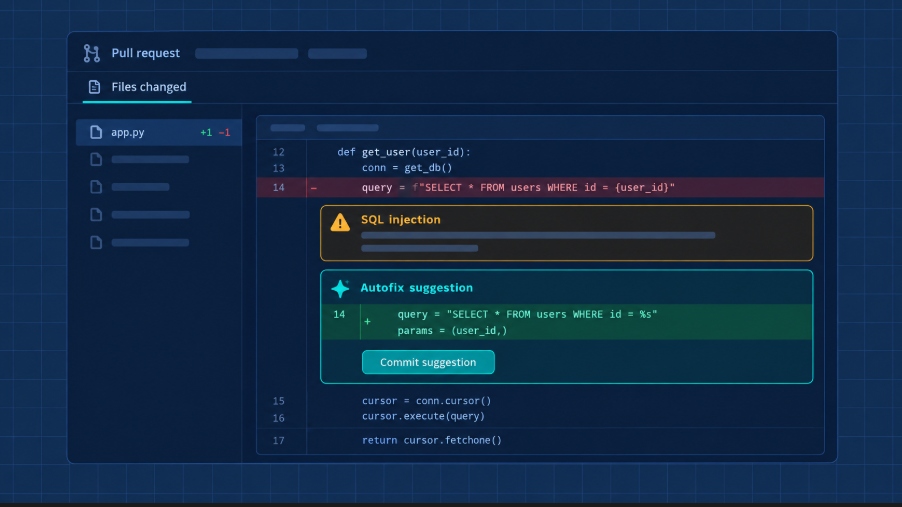
At the heart of Code Security is CodeQL, GitHub’s semantic analysis engine. Rather than matching simple patterns, CodeQL traces how data flows through an application, so it can spot issues such as untrusted input reaching a sensitive function. Findings appear in real time, on the pull request, where the developer who wrote the code can act on them.
Copilot Autofix: from alert to fix in minutes
Detection alone does not reduce risk. Copilot Autofix analyses the context of a CodeQL alert, explains the underlying issue and proposes a targeted fix that the developer can review and apply without leaving their workflow. GitHub reports an average of 28 minutes from detection to remediation, remediation that is three times faster on average, and AI-powered suggestions for 90% of alert types.
Dependency review and EPSS prioritisation
Much of today’s risk lives in open-source dependencies. Dependency review scans pull requests and compares the base and head branches, flagging packages with known vulnerabilities before they are merged. For dependencies already in use, Dependabot alerts now include the Exploit Prediction Scoring System (EPSS) from FIRST, which estimates the likelihood that a vulnerability will be exploited in the next 30 days. That gives teams a practical way to decide which of hundreds of alerts to tackle first.
Security campaigns: burning down security debt
Existing backlogs need a different approach from new code. Security campaigns give security teams a structured way to group related vulnerabilities across many repositories, assign owners, prioritise the work and follow progress on a single dashboard. Campaigns can be organised by vulnerability type, compliance requirement or any other grouping that fits the organisation.
The two products at a glance
| Area | GitHub Secret Protection | GitHub Code Security |
|---|---|---|
| Main risk addressed | Leaked credentials, tokens and keys | Code vulnerabilities and vulnerable dependencies |
| Prevention | Push protection with optional delegated bypass | CodeQL checks and dependency review on pull requests |
| Detection | Secret scanning in code, issues and discussions, plus Copilot detection of generic passwords | CodeQL data-flow analysis and Dependabot alerts |
| Prioritisation | Validity checks and public leak metadata | Severity, EPSS scores and security campaigns |
| Remediation | Faster revocation and rotation through 150+ provider partners | Copilot Autofix suggestions for CodeQL alerts |
Where to start: a free security risk assessment
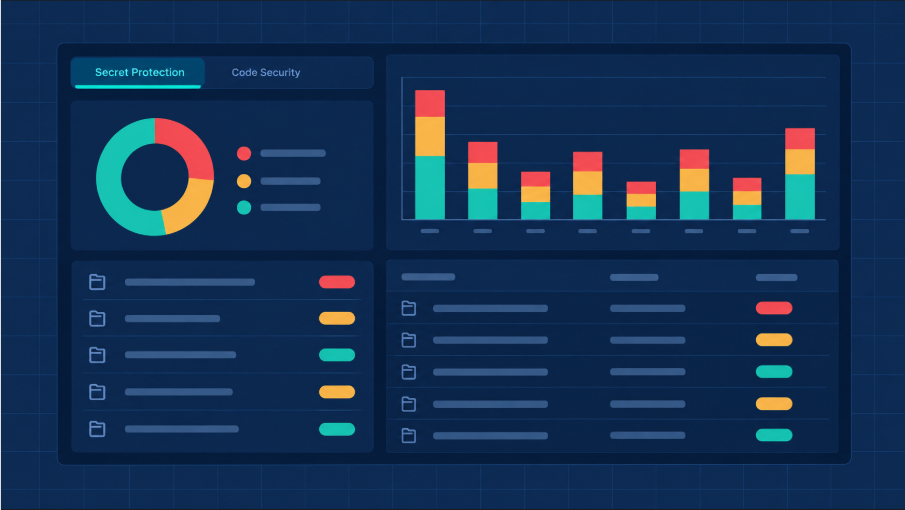
GitHub security risk assessment dashboard
The hardest part of any security investment is building the business case. Most evaluations rely on vendor benchmarks, demos or feature comparison tables. GitHub’s security risk assessments take a different approach: they scan your own repositories, so the findings reflect what your developers actually ship. As GitHub puts it, you decide with evidence, not assumptions.
Two assessments, one report
The secret risk assessment reviews every repository in the organisation for exposed credentials, across both provider-specific and generic patterns. It shows where secrets appear, which types are most common and where protection would reduce risk. The code security risk assessment uses CodeQL to scan up to 20 repositories, by default those with the most commit activity in the last 90 days, and breaks the findings down by severity, including where Copilot Autofix could speed up remediation.
What to know before you run it
- The assessment is free, including the GitHub Actions minutes used for the code scans, and no Secret Protection or Code Security licences are charged while it runs.
- It can be started by organisation owners and security managers on GitHub Team or GitHub Enterprise Cloud; the code security assessment also ships in GitHub Enterprise Server 3.23.
- Most scans finish within 30 minutes, and GitHub emails you when the report is ready.
- It uses a separate upload path, so it does not touch existing code scanning alerts.
- It can be repeated every 90 days, with a different set of repositories each time.
- Results go to your GitHub account team only if you opt in; otherwise they see just that an assessment was run.
A clean result is valuable too. Quiet findings give you evidence that current practices are working, while specific findings, such as live credentials or vulnerable repositories, give you a fact-based case for action. From the report, eligible enterprise admins can start a GitHub Advanced Security trial directly, or enable Secret Protection or Code Security.
A practical rollout path
Most organisations get the best results by introducing the capabilities in stages rather than switching everything on at once.
- Run both risk assessments to establish a baseline of leaked secrets and code vulnerabilities.
- Enable push protection to stop new secrets at the source, and agree a delegated bypass process with your security team.
- Triage existing secret alerts using validity checks, revoking and rotating active credentials first.
- Add CodeQL and dependency review workflows in GitHub Actions for your most active repositories, with Copilot Autofix available to developers.
- Use security campaigns and EPSS scores to burn down the historical backlog, then re-run the assessments every 90 days to measure progress.
Putting it to work in GitHub Actions
For most teams the real work happens in GitHub Actions. Secret Protection runs on the platform itself, but code scanning and dependency review live in your workflows, next to build and test, so security results show up as checks on every pull request rather than in a separate tool.
CodeQL and dependency review as workflows
For CodeQL, GitHub offers two paths. Default setup is the quickest: GitHub detects the languages and runs analysis for you. Advanced setup generates a CodeQL workflow file in .github/workflows that you customise with standard workflow syntax, for example to add build steps for compiled languages, change triggers or pick query suites. Either way, the analysis runs on GitHub Actions and uses Actions minutes, and GitHub also ships workflow templates for third-party scanners under the Security category when you create a new workflow.
Dependency review is just as easy to wire in. The dependency-review-action reports on dependency changes in a pull request and can enforce policy directly in the workflow: fail-on-severity blocks pull requests that add vulnerabilities at or above a chosen severity, allow-licenses or deny-licenses enforce licence rules, and fail-on-scopes limits enforcement to runtime or development dependencies. A minimal workflow, based on the GitHub Docs example, looks like this:
name: 'Dependency Review'
on: [pull_request]
permissions:
  contents: read
jobs:
  dependency-review:
    runs-on: ubuntu-latest
    steps:
      - uses: actions/checkout@v6
      - uses: actions/dependency-review-action@v4
        with:
          fail-on-severity: critical
A practical baseline for an Actions-based repository
- Turn on push protection across the organisation first: it needs no workflow at all and stops new secrets immediately.
- Commit the suggested CodeQL workflow. It analyses code on every push to the default or protected branches and on every pull request against the default branch, so findings appear before code is merged.
- Add a dependency review workflow on
pull_request, start withfail-on-severityset tocritical, and tighten the threshold once teams are used to it. - Mark the CodeQL and dependency review jobs as required status checks on your default branch, so a failing security check blocks the merge instead of becoming another ignored warning.
Go one step further: no secrets in the pipeline at all
Secret Protection catches credentials before they leak. The safest secret, though, is the one that never exists. In my own work automating Microsoft Sentinel deployments with GitHub Actions, workflows authenticate to Azure with OIDC workload identity federation instead of stored client secrets.
The runner requests a signed, short-lived token from GitHub’s OIDC provider. Microsoft Entra ID validates it against a federated credential and returns a scoped Azure token. There is nothing to rotate, nothing to store and nothing for secret scanning to find.
The federated credential needs three values:
- Issuer: https://token.actions.githubusercontent.com
- Subject: repo:<org>/<repo>:ref:refs/heads/main
- Audience: api://AzureADTokenExchange
Pair it with least-privilege RBAC on the target resource group, so the workflow can deploy exactly what it needs and nothing more.
In the workflow itself, the only change is the id-token: write permission and the Azure Login action. The client, tenant and subscription IDs are stored as GitHub secrets for convenience, but they are identifiers, not credentials:
name: Deploy Sentinel content
on:
push:
branches: [main]
permissions:
id-token: write # required to request the OIDC token
contents: read
jobs:
deploy:
runs-on: ubuntu-latest
steps:
– uses: actions/checkout@v6
– name: Azure login with OIDC
uses: azure/login@v2
with:
client-id: ${{ secrets.AZURE_CLIENT_ID }}
tenant-id: ${{ secrets.AZURE_TENANT_ID }}
subscription-id: ${{ secrets.AZURE_SUBSCRIPTION_ID }}
– name: Deploy
uses: azure/cli@v2
with:
inlineScript: |
az deployment group create
–resource-group
–template-file ./sentinel/main.bicep
The same pull request discipline applies to security checks. Protect main from direct pushes, run automated validation on every PR, and require two approvals for high-impact changes. CodeQL and dependency review then become just another quality gate in a pipeline that already treats configuration as code.
Final thoughts
Security tools only deliver value when they are adopted, tuned and owned by the teams that ship the code. With GitHub Advanced Security the path is short: stop new secrets at the push, run CodeQL and dependency review as GitHub Actions on every pull request, make those checks required, and use Copilot Autofix and security campaigns to burn down what is already there. If you want to know how exposed your repositories are today, the free risk assessment is the easiest first step.