Shadow AI — employees adopting AI tools and autonomous agents outside of IT’s visibility — has quickly become one of the fastest-growing governance challenges in the enterprise. Microsoft’s new Shadow AI (Frontier) capability in the Microsoft 365 admin center is built to close that gap by discovering unmanaged AI agents running on managed endpoints.
In this LAB, I set out to answer a simple question: can Shadow AI (Frontier) actually detect an unsanctioned AI agent installed on a managed device and correlate it back to the endpoint? The short answer — yes.
Key takeaway
Shadow AI (Frontier) successfully discovered an unmanaged AI agent (OpenClaw) on a managed endpoint (VM2), correlated it to the device through Microsoft Defender telemetry, and surfaced it in the Shadow AI portal — giving security teams the visibility needed for investigation, governance, and future policy enforcement.
What is Shadow AI (Frontier)?
Shadow AI (Frontier) extends Microsoft’s existing endpoint and security stack to surface AI agents that were never sanctioned or managed by IT. Rather than relying on a user actively prompting a tool, it works from endpoint signals — the presence of an AI agent and its activity on a device — to identify, attribute, and report unmanaged AI usage across the estate.
Shadow AI refers to consumer-facing AI applications and standalone agents deployed across your organization without IT visibility or approval. These agents can operate autonomously on user devices, creating blind spots in your security and compliance posture. While these agents can boost productivity, unmanaged usage introduces significant risks, such as the following:
- Data leakage.
- Compliance violations.
- Security vulnerabilities.
- Lack of auditability and governance.
The test environment
Prerequisites
To use Shadow AI detection and governance, you need:
Microsoft 365 E5 license to view Shadow AI Agents.
At least one of the following roles:
Security Administrator.
AI Administrator.
Global Reader.
Security Reader.
Security Operator.
Reports Reader.
User Experience Success Manager.
Intune Administrator.
Microsoft Intune enrollment for managed Windows devices.
Opt in to the Frontier preview experience in the Microsoft 365 admin center.
Enable Global Secure Access (GSA) for your tenant and enrolled devices to view additional metadata on how detected agents are being used.
Before testing, we configured the following components in the Lab tenant:
| Component | Configuration |
| Licensing | Microsoft 365 E5 tenant licence |
| Shadow AI (Frontier) | Enabled at the tenant level |
Note: According to the Microsoft documentation, Shadow AI requires Microsoft 365 E5 and enrollment in the Frontier preview program. E7 is not listed as a prerequisite. It is possible that the feature has not yet been enabled for your tenant, or that the tenant is not enrolled in the Frontier preview, which would explain why the Shadow AI section is not visible despite having E5 licensing
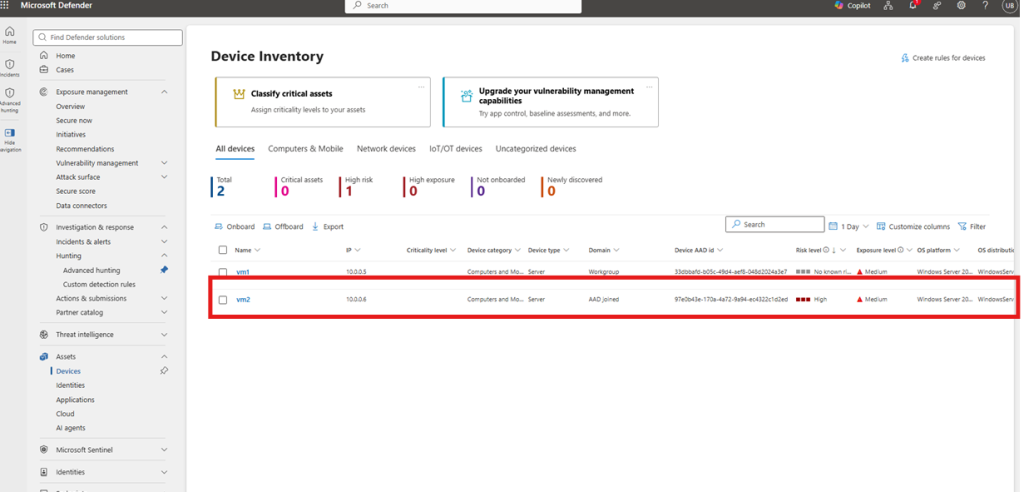
| Endpoint | Test VM (VM2) onboarded to Microsoft Defender for Endpoint and visible in Microsoft Defender XDR |
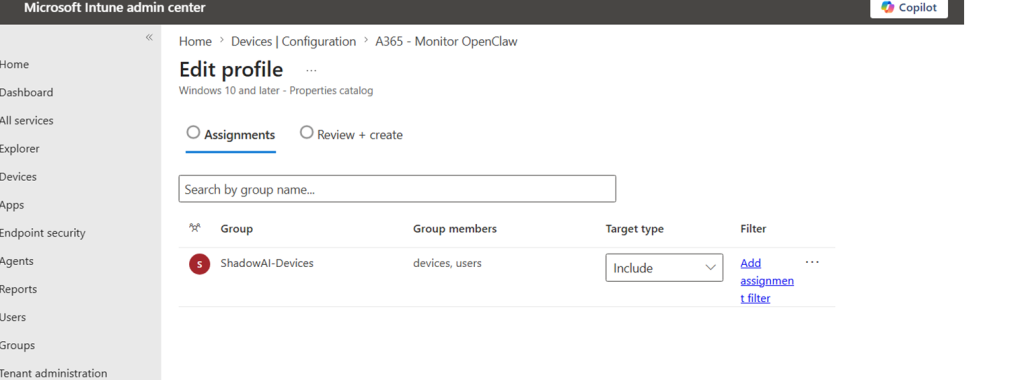
| Device grouping | Dedicated ShadowAI-Devices security group in Microsoft Entra ID |
| Policy | “Monitor OpenClaw” policy assigned to the device group |
| Management | Device managed through Microsoft Defender / Intune (MDE-managed) |
How I validated it
I ran the validation end to end, from onboarding the device to confirming correlation in the Shadow AI portal:
- Applied the A365 – Monitor OpenClaw policy to the device group.
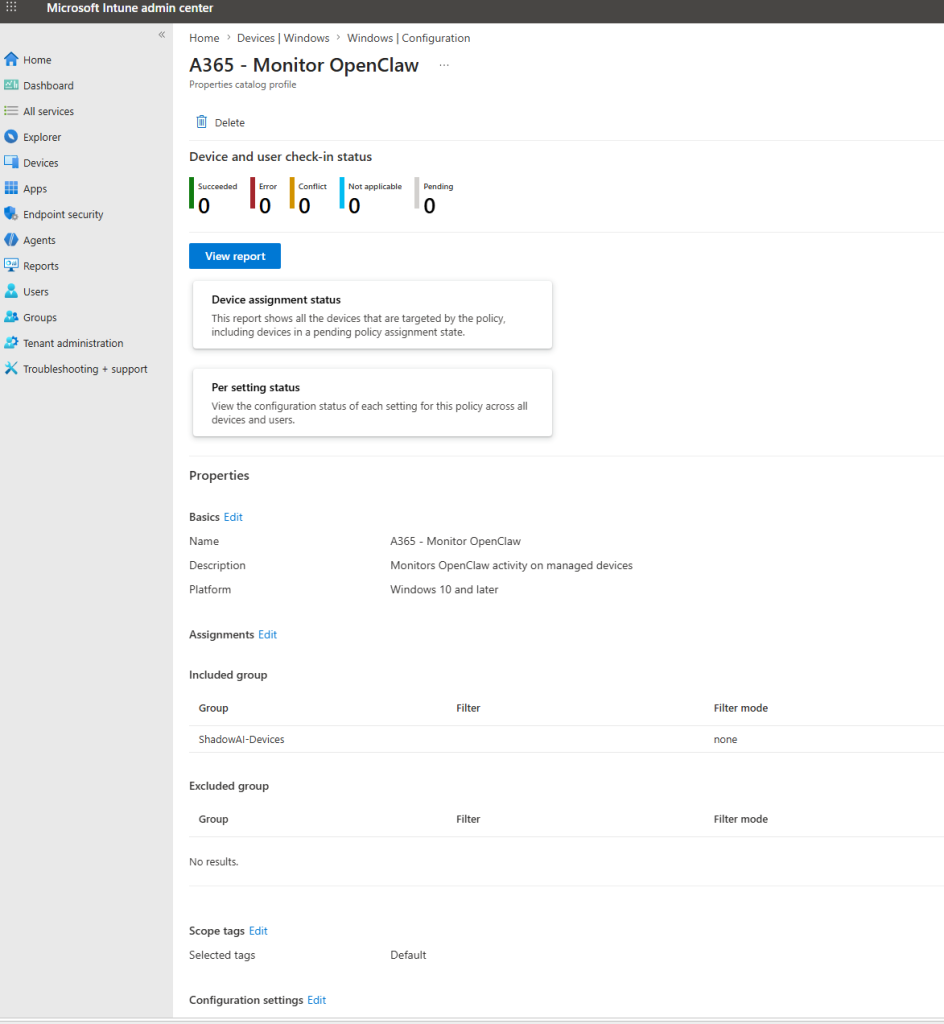
2. Added VM2 to the ShadowAI-Devices group in Intune Admin center.
- Confirmed onboarding device in Defender XDR .
- Installed and executed OpenClaw on VM2.
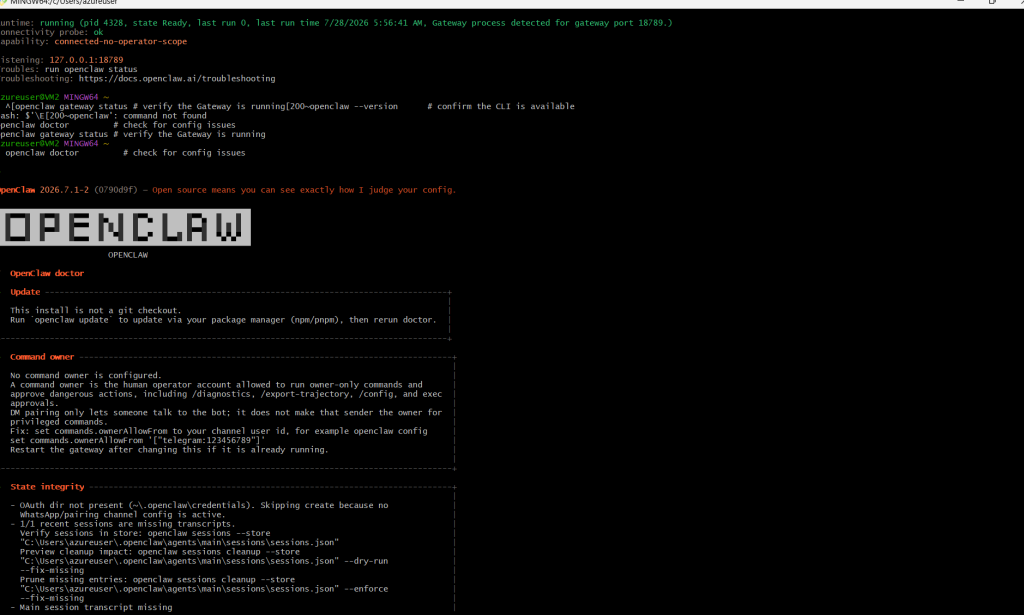
- Generated OpenClaw activity, including gateway initialization and command execution.
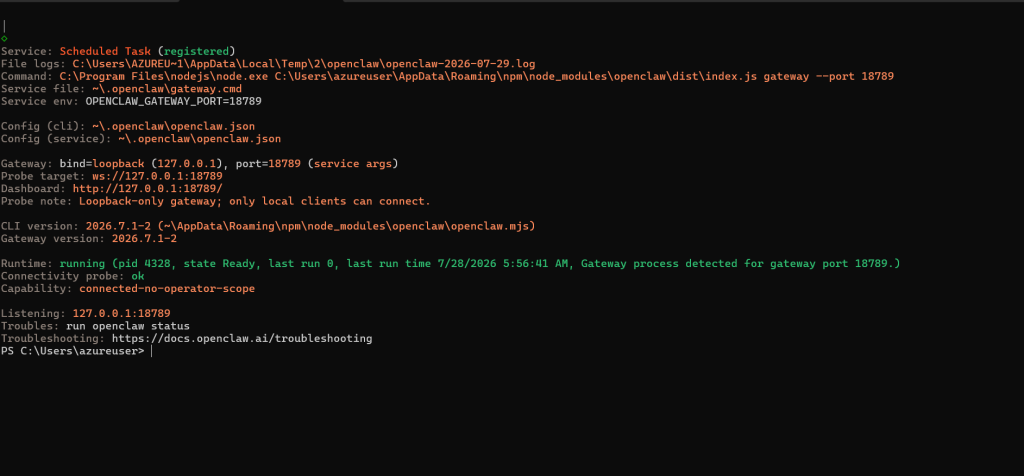
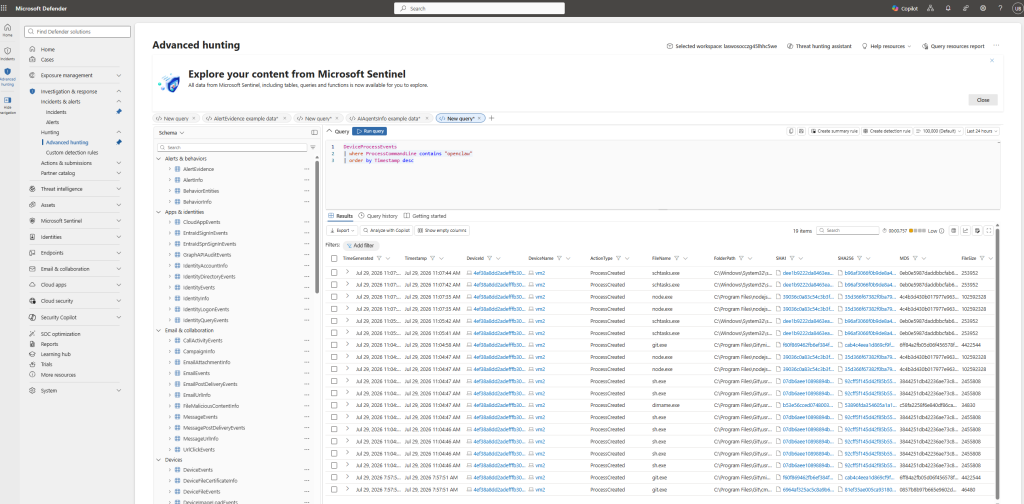
- Verified telemetry collection through Microsoft Defender Advanced Hunting.
- Confirmed Defender detection of OpenClaw-related processes and files.
- Waited for Shadow AI backend processing and device correlation.
Advanced Hunting — OpenClaw processes, gateway activity, and file-creation events on VM2
Simple: KQL query
DeviceProcessEvents
| where ProcessCommandLine contains “openclaw”
| order by Timestamp desc
What I observed
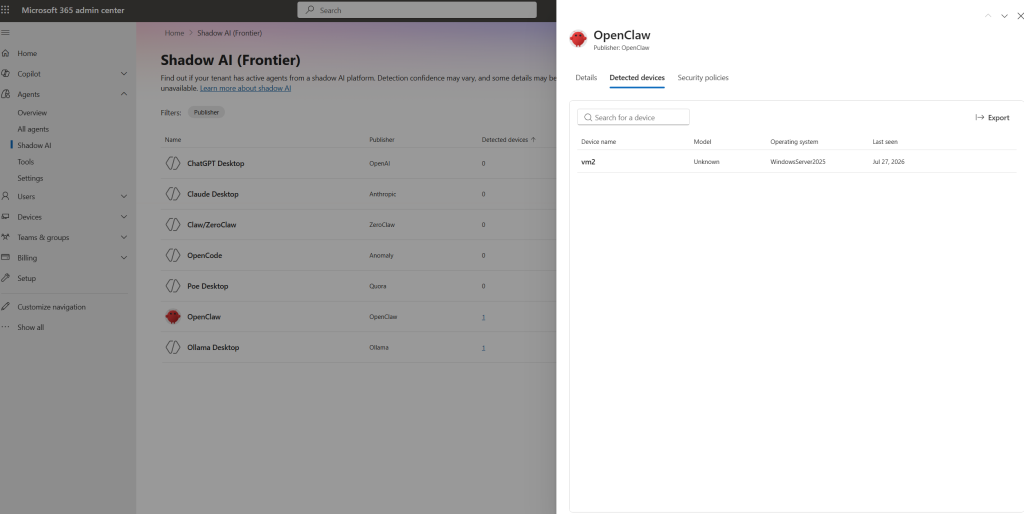
- OpenClaw was identified as a Shadow AI platform by Shadow AI (Frontier).
- Microsoft Defender detected the OpenClaw installation and execution activity on VM2.
- Advanced Hunting provided visibility into OpenClaw processes, gateway activity, and file-creation events.
- Shadow AI (Frontier) automatically correlated the activity to the managed endpoint VM2.
- VM2 now appears under OpenClaw → Detected Devices within the Shadow AI portal.
Shadow AI portal — OpenClaw → Detected Devices showing VM2
View Shadow AI agent details
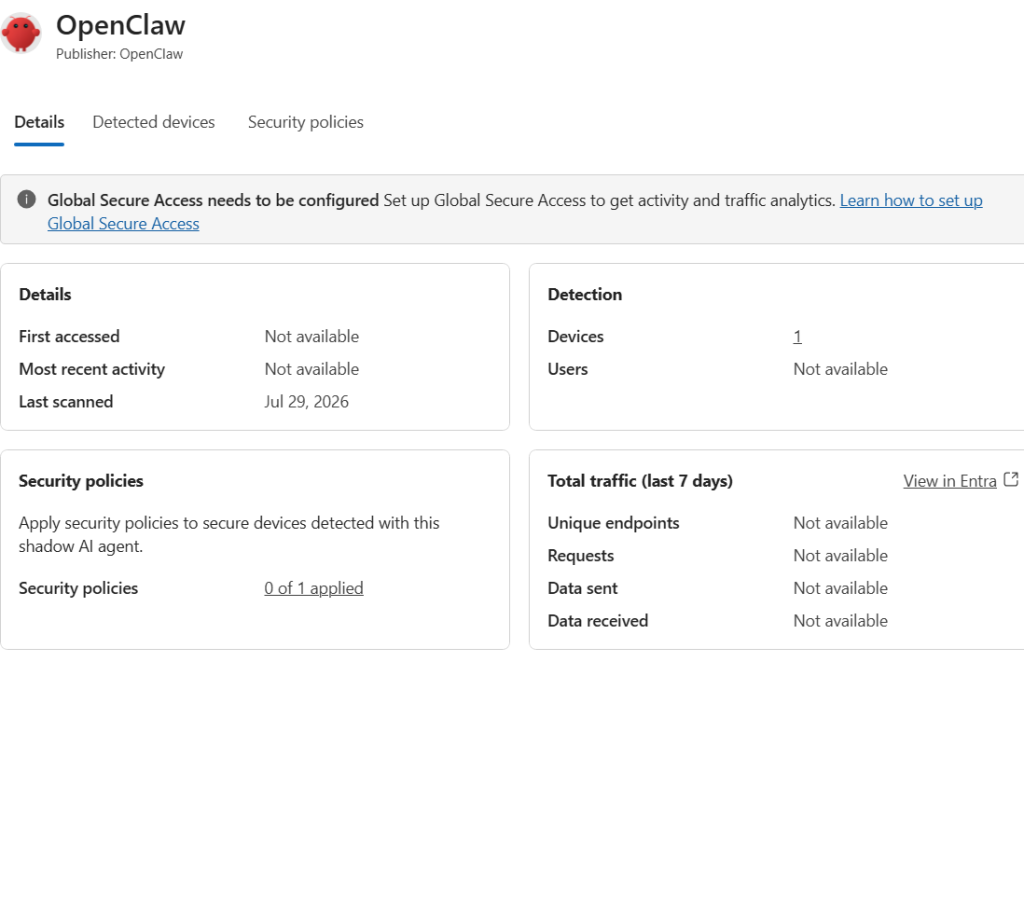
To view Shadow AI agent details, such as OpenClaw details, select the Shadow AI agent from the list of agents in the Shadow AI (Frontier) page.
The details pane opens for the selected Shadow AI agent.
Confirm Details is selected.
The Details pane provides the following agent information:
Why this matters
This validation confirms that Microsoft Shadow AI (Frontier) can discover unmanaged AI agents running on managed endpoints, correlate them to specific devices, and give security teams the visibility they need for investigation, governance, and future policy enforcement.
Just as important is how it discovered the agent. Detection worked from installation and endpoint telemetry alone — Shadow AI (Frontier) identified the OpenClaw installation and correlated it to the device without requiring active prompt execution or ongoing agent interaction. With the agent surfaced and attributed to a device, the path to enforcement is clear.
From discovery to control
With OpenClaw successfully correlated to VM2, Shadow AI (Frontier) enables organizations to move beyond visibility and into governance. Administrators can review detected agents, assess risk, and apply blocking policies through Microsoft Intune, creating a complete lifecycle of Discovery → Governance → Enforcement.
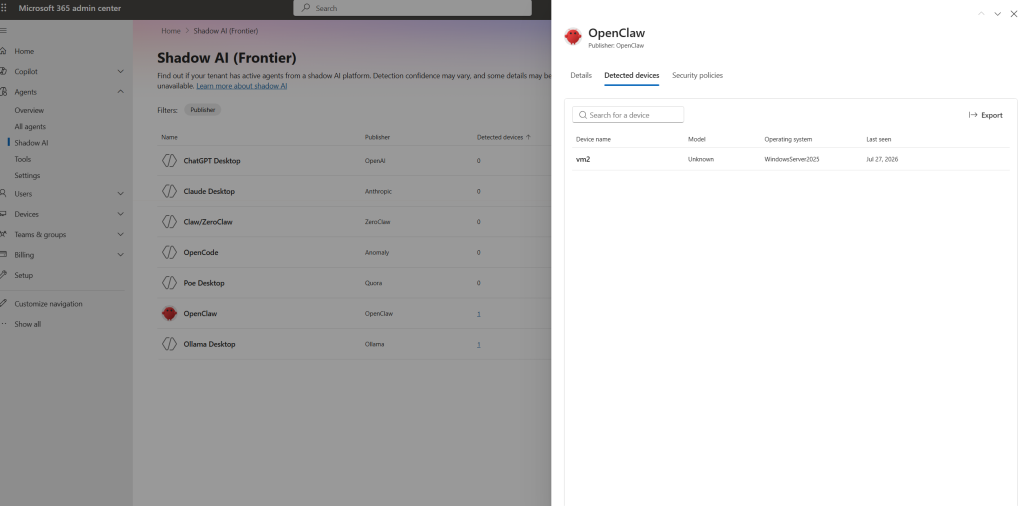
Microsoft Defender continued to observe the related processes and activity, while Shadow AI (Frontier) successfully correlated the agent to the managed endpoint and surfaced it in the Shadow AI portal.
With the agent surfaced and tied to a device, the loop closes from discovery → governance → enforcement: shadow AI can now be blocked by security policy.
Blocking a Shadow AI agent
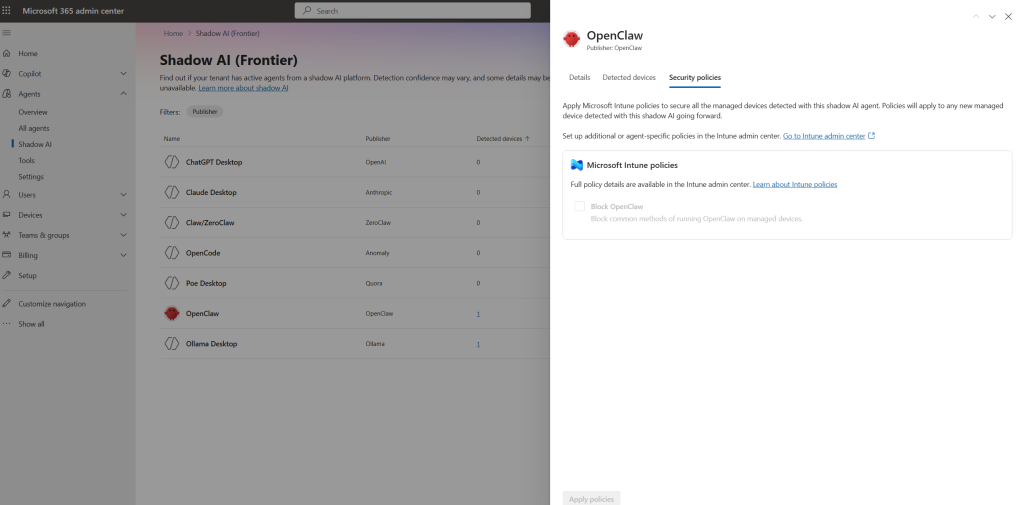
After detection is enabled and the Shadow AI agent is identified in your environment, you can block it to prevent execution on managed devices. When a Shadow AI agent is blocked, such as OpenClaw, it blocks common ways of running it by creating a new Microsoft Intune policy that automatically propagates to all managed Windows devices enrolled in Intune.
To view the policy details, search for the policy name A365 – Block OpenClaw Depending on how Intune is configured in your organization, this Intune policy update could take anywhere from 15 minutes up to 8 hours to apply. Full policy details, including when Intune policy applies, can be found in Intune. Lastly, policies can also be edited in Intune to add additional controls.
To block a Shadow AI agent, follow these steps:
Under Security policies, select Block > Apply Policies.
In the Shadow AI agent details pane, select Security policies.
Conclusion
The rapid adoption of AI agents is creating a new visibility challenge for security and IT teams. Traditional governance models often rely on approved applications, user awareness, and policy enforcement, but unmanaged AI agents can be deployed and operated outside those controls.
This validation demonstrates that Microsoft Shadow AI (Frontier) provides organizations with a practical mechanism for identifying these emerging risks. By leveraging Microsoft Defender endpoint telemetry, the platform can discover unmanaged AI agents, associate them with specific devices, and provide the context required for investigation and governance.
As AI adoption accelerates across enterprises, visibility will become just as important as protection. The ability to identify unsanctioned AI tools early, understand where they are being used, and take appropriate action enables organizations to balance innovation with security. Shadow AI (Frontier) represents an important step toward extending Zero Trust principles to the growing ecosystem of AI agents and autonomous tools.
For security teams, the message is simple: you cannot govern what you cannot see. Shadow AI (Frontier) helps close that visibility gap and provides the foundation for effective AI governance at scale.
References : Understand Shadow AI in Microsoft 365 admin center – Microsoft 365 admin | Microsoft Learn