Manually deploying Microsoft Sentinel resources can take a lot of time and often leads to mistakes.
Using GitHub Actions and Infrastructure‑as‑Code, you can automate everything — Sentinel solutions, analytics rules, automatic rules, hunting queries, and workbooks — so that a single push to your repo triggers the entire deployment.
In this guide, I show how to set up this automated process using GitHub Actions with Azure federated authentication. This removes the need for secrets and makes the whole pipeline cleaner and safer.
This is especially helpful if you just want to test Sentinel quickly, without clicking through dozens of screens in the Azure portal.
Microsoft Sentinel Repositories helps you automate the deployment and management of your Microsoft Sentinel content through central repositories.
Prerequisites
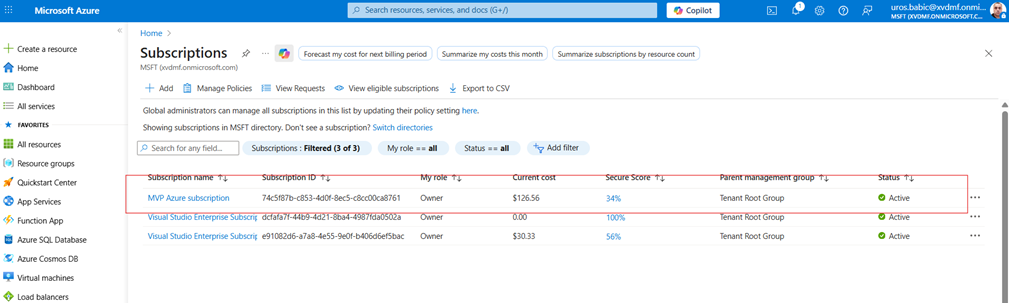
- An Azure subscription with Microsoft Sentinel enabled
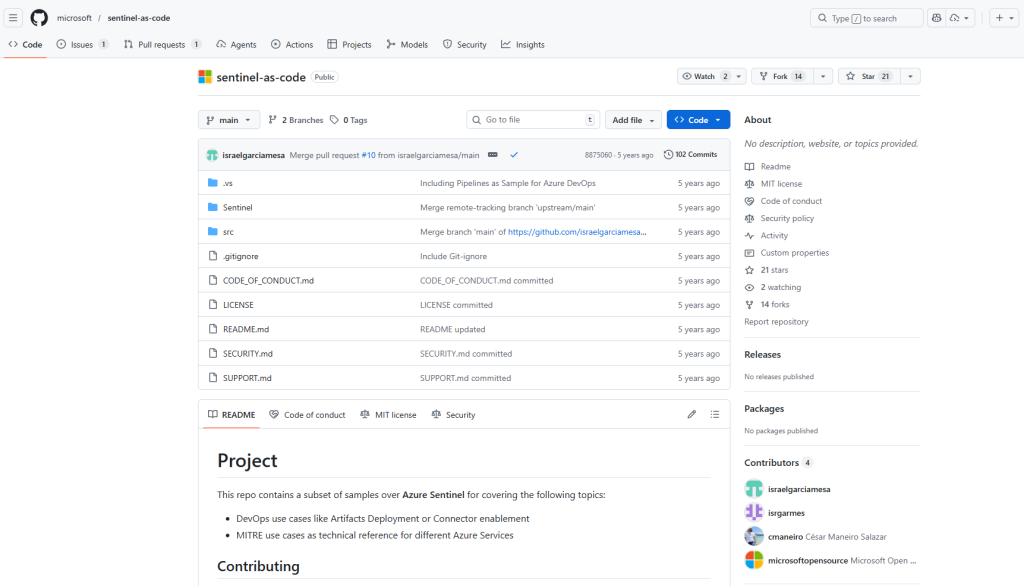
Microsoft GitHub repository https://github.com/microsoft/sentinel-as-code
- Administrative access to create Entra ID app registrations
- Setting Up Federated Authentication with Entra ID
The first step is establishing secure authentication between GitHub Actions and Azure without storing sensitive credentials in your repository.
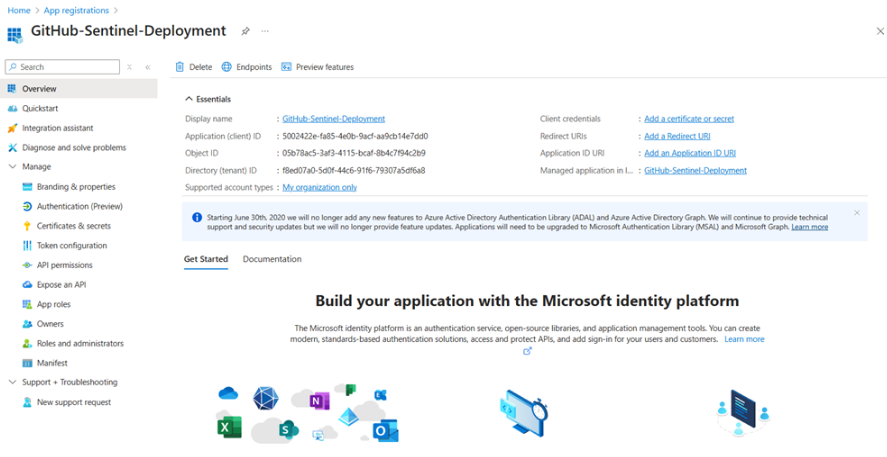
Creating the Entra ID App Registration
- Navigate to the Azure portal and open Entra ID
- Select App registrations from the left menu
- Click New registration
- Provide a meaningful name like “GitHub-Sentinel-Deployment”
- Leave the default settings and click Register
Configuring Federated Credentials
Once your app registration is created, you’ll need to set up the federated identity credentials:
- In your new app registration, navigate to Certificates & secrets
- Select the Federated credentials tab
- Click Add credential
- Choose GitHub Actions deploying Azure resources as the scenario
- Fill in your repository details:
- Organization: GitHub username or organisation
- Repository:Repository name
- Entity type: Branch
- Branch name: main
- Provide a name and description for the credential
- Click Add
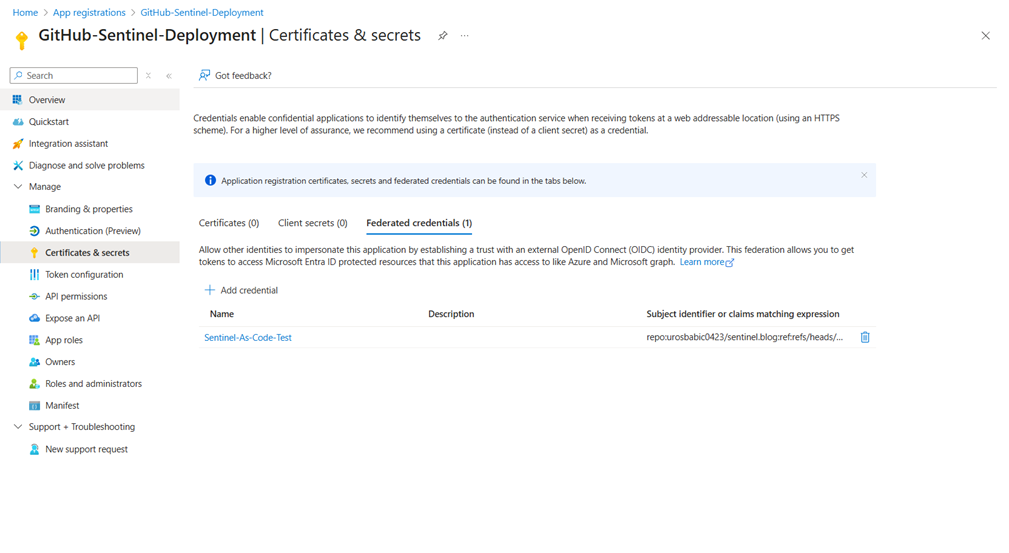
Federated credentials configuration
- Assigning Azure Permissions
Your app registration needs appropriate permissions to manage Sentinel resources:
- Navigate to your Resource Group in the Azure portal
- Select Access control (IAM)
- Click Add role assignment
- Choose Microsoft Sentinel Contributor role
- Select your app registration as the member
- Complete the assignment
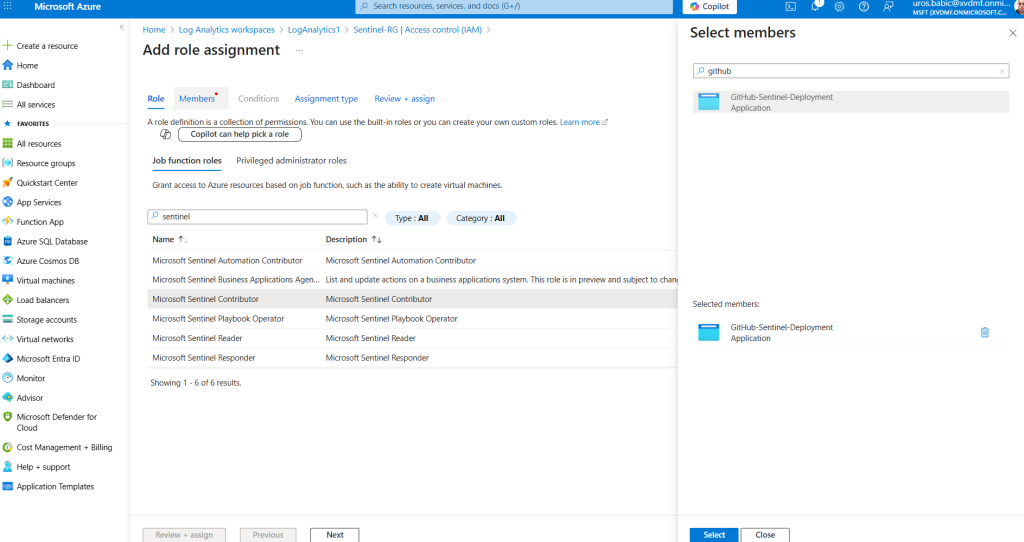
Configuring GitHub Repository Variables
GitHub repository needs several configuration variables and secrets. Navigate to repository settings and add these:
- Secrets
- SENTINEL_CLIENTID: 5002422e-fxxxx-4e0b-9acf-aa9cbXXXXXXX
- SENTINEL_TENANTID: Your Azure tenant ID: f8ed07a0-5d0f-44c6-91f6-79307a5df6a8
- SENTINEL_SUBSCRIPTIONID: Your Azure subscription ID:
74c5f87b-c853-4d0f-8ec5-c8cc00ca8761 - Variables
- RESOURCE_GROUP: sentinel-rg
- WORKSPACE_NAME: LogAnalytics1
- REGION: Azure region France Central
- SENTINEL_SOLUTIONS: Comma-separated list of solutions to deploy
- “Azure Activity”,”Azure Key Vault”,”Azure Logic Apps”
- AR_SEVERITIES: Alert rule severities to include (e.g., “High,Medium”)
Github repository Secrets and variables allow you to manage reusable configuration data. Secrets are encrypted and are used for sensitive data.
- Secrets:
- Encrypted at rest and in transit.
- Used for sensitive data like client IDs, tenant IDs, subscription IDs, API keys.
- Accessible only within workflows and never exposed in logs unless explicitly echoed (which should be avoided).
- Variables:
- Used for non-sensitive, reusable configuration like resource group names, workspace names, regions, solution lists.
- Easier to manage and update without changing workflow code.
GitHub repository secrets
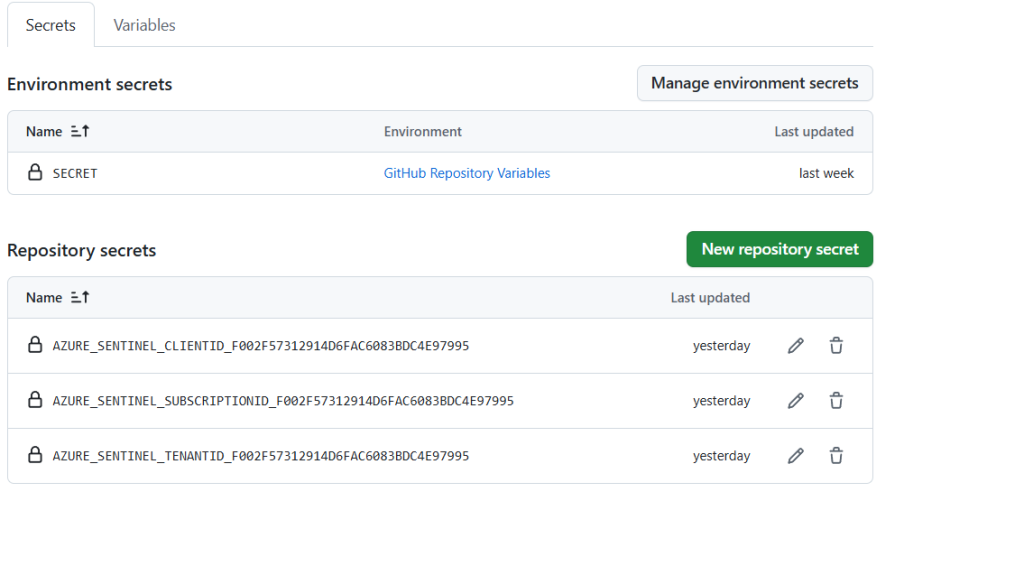
Understanding the Workflow
The GitHub Action workflow automates Microsoft Sentinel deployment by following these steps:
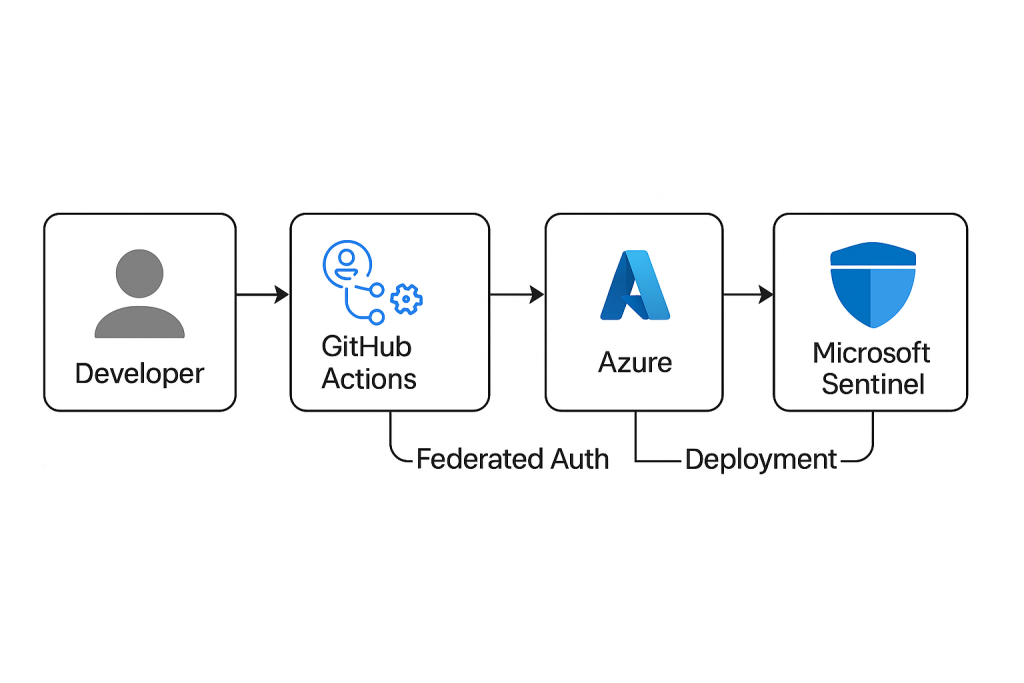
- Triggering the Workflow
- The workflow runs automatically on push events to the
mainbranch or can be triggered manually via workflow dispatch. - This ensures that any approved changes in the repository immediately reflect in Sentinel.
- The workflow runs automatically on push events to the
- Checkout Repository
- The first step uses
actions/checkout@v3to pull the latest code from the repository, including scripts and configuration files.
- The first step uses
- Authentication to Azure
- The workflow uses
azure/login@v2to authenticate with Azure via Federated Identity Credentials. - This eliminates the need for storing long-lived secrets and aligns with Zero Trust principles.
- Required inputs:
client-id(App Registration ID)tenant-id(Azure Tenant)subscription-id(Azure Subscription)
- The workflow uses
- Deployment of Sentinel Content
- The workflow executes a PowerShell script (
Set-SentinelContent.ps1) usingazure/powershell@v1. - This script:
- Enables Microsoft Sentinel solutions (e.g., Azure Activity, Key Vault).
- Deploys Analytics Rules, Workbooks, and other content.
- Filters alert rules by severity (e.g., High, Medium).
- Parameters like
RESOURCE_GROUP,WORKSPACE_NAME, andREGIONare passed as GitHub Variables, while sensitive data like IDs are stored as Secrets.
- The workflow executes a PowerShell script (
- Result
- After successful execution, Sentinel is updated with the latest configurations from the repository.
- The workflow logs provide visibility into each step, ensuring auditability and troubleshooting.
The GitHub Action workflow automatically triggers on pushes to the main branch and can also be manually executed.
Let’s break down the key components:
Authentication Step
- name: Login to Azure
uses: azure/login@v2
with:
client-id: ${{ secrets.SENTINEL_CLIENTID }}
tenant-id: ${{ secrets.SENTINEL_TENANTID}}
subscription-id: ${{ secrets.SENTINEL_SUBSCRIPTIONID }}
environment: ‘AzureCloud’
audience: api://AzureADTokenExchange
enable-AzPSSession: true
This step uses the federated credentials we configured earlier, eliminating the need for storing sensitive client secrets.
Deployment Step
The workflow executes a PowerShell script that handles the actual Sentinel configuration:
- name: Enable Sentinel Solutions and Alert Rules
uses: azure/powershell@v1
with:
inlineScript: |
& “${{ github.workspace }}/Scripts/Set-SentinelContent.ps1” `
-ResourceGroup ‘${{ vars.RESOURCE_GROUP }}’ `
-Workspace ‘${{ vars.WORKSPACE_NAME }}’ `
-Region ‘${{ vars.REGION }}’ `
-Solutions ${{ vars.SENTINEL_SOLUTIONS }} `
-SeveritiesToInclude ${{ vars.AR_SEVERITIES }} `
-IsGov ‘false’
Key Elements in GitHub Action Deployment: 
- Repository Name
- Microsoft GitHub repository https://github.com/microsoft/sentinel-as-code
- Actions Tab
- The highlighted tab is Actions, indicating the user is viewing GitHub Actions workflows.
- Workflow List
- Several workflows are listed:
- Deploy Content to loganalytics1
- Deploy Content to Microsoft Sentinel
- Deploy Defender XDR Custom Detections
- Pull external data source Sentinel UI
- Pull Google One VPN IP Ranges
- Pull Cloud Private Relay IP Ranges
- Pull Proton VPN Server Data
- Pull TOR Exit Nodes Data
- Most workflows are marked as Disabled, except the selected one.
- Several workflows are listed:
- Selected Workflow Details (Main Panel)
- Workflow Name:
Deploy Content to loganalytics1 [f002f573-1291-4d6f-ac60-83bdc4e97995] - Workflow File:
sentinel-deploy-f002f573-1291-4d6f-ac60-83bdc4e97995.yml - Run History: Shows 1 workflow run:
- Event: Push to branch
main - Status: Successful (green checkmark)
- Actor:
azure-sentinel-bot - Duration: 1 minute 52 seconds
- Commit:
8b3ba9
- Event: Push to branch
- Workflow Name:
- Additional UI Elements
- Filter workflow runs search bar.
- Help banner: “Help us improve GitHub Actions.”
- New workflow button (green).
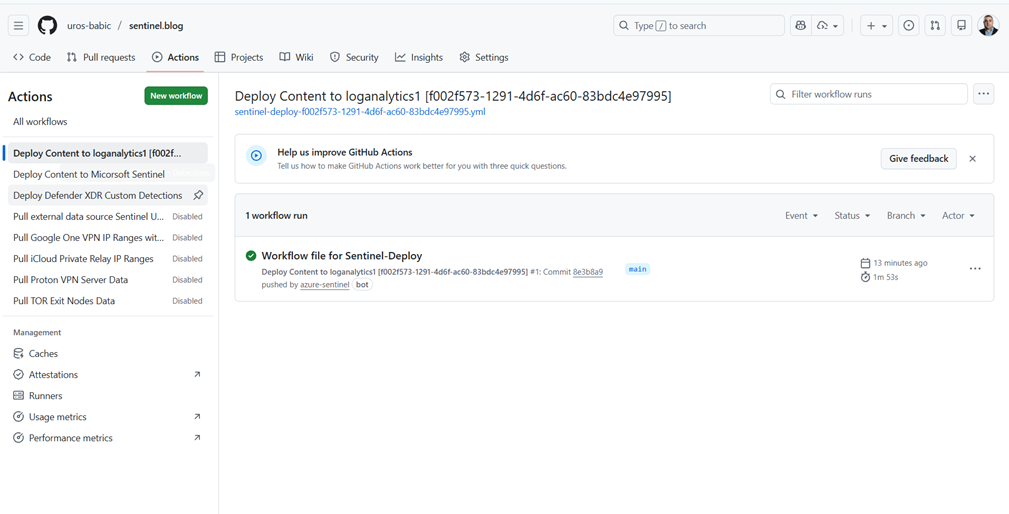
This confirms that the GitHub Action workflow for deploying Microsoft Sentinel content ran successfully. The workflow is triggered by a push to the main branch and uses the YAML file sentinel-deploy-sentinel-as/code.yml.
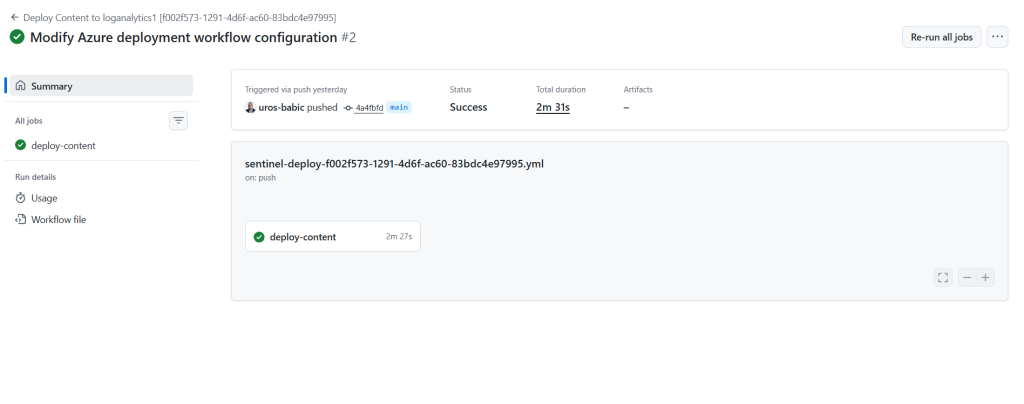
The automation likely includes steps for authenticating to Azure and deploying Sentinel resources (solutions, alert rules, etc.)
Repository Structure
Organize your repository with the following structure:
sentinel-as-code/
├── .github/
│ └── workflows/
│ └── deploy-sentinel.yml
├── Scripts/
│ └── Set-SentinelContent.ps1
├── Solutions/
│ ├── solution1.json
│ └── solution2.json
└── README.md
Microsoft Sentinel’s Continuous Deployment feature in Defender XDR enables automated integration between Sentinel and source control repositories like GitHub or Azure DevOps. This page lists the repositories currently connected for deployment, showing details such as the repository name, last deployment status, source control type, repository URL, branch, and content types being deployed.
In this case, there are active connection using GitHub Action, both successfully deploying Workbooks from their respective main branches.
This setup ensures that Sentinel content (such as workbooks, analytics rules, or playbooks) is automatically synchronized from version-controlled repositories, promoting consistency and reducing manual effort in managing security content.
All action GitHub-Sentinel-Deployment conducted in Defender XDR, in location Sentinel—-Content Management—Repositories
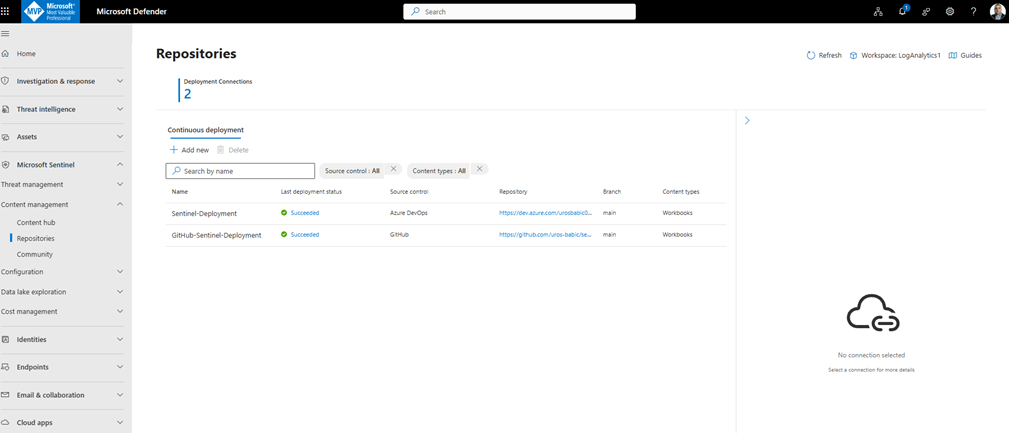
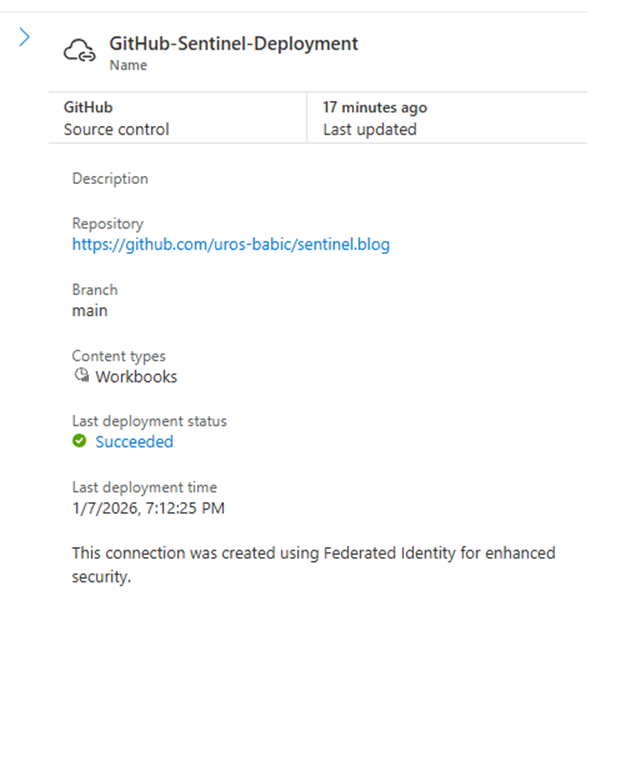
With GitHub settings: Github-Sentinel-Deployment
Common repository architecture patterns for MSSPs
Reference: Microsoft Defender portal implementation guide for MSSPs
A key consideration with multi-customer CI/CD pipelines is choosing the best structure to serve all clients. While there’s no universal approach, here are three patterns we recommend considering:
Pattern 1: Central repository for generic content, customer-specific repositories for tailored content
- One central repository for common content deployed to all customers
- Individual repositories for customer-specific customizations
- Each customer workspace connects to both repositories
- Optimal for MSSPs with balanced common and tailored content needs

Pattern 2: Single repository with custom folders
- All content in one repository
- Folder structure based on shared data sources – for example, Entra ID Analytics – or customer names
- Deployment pipelines customized per customer connection
- Requires more initial setup but simplifies repository management

Pattern 3: One repository per customer
- Complete content separation across customers
- Full customization flexibility for each customer
- Best for customers with unique content requirements
- Higher management overhead but maximum isolation

To customize your CI/CD pipelines, use configuration files in each repository branch to prioritize deployment of high-priority content, exclude content you don’t want to deploy, and map parameter files to their corresponding content files
Bringing a DevSecOps Mindset to Microsoft Sentinel
Applying DevSecOps principles to Microsoft Sentinel means treating security as an integral part of the entire development and operations lifecycle — not something that happens after deployment. Instead of manual, inconsistent, and error‑prone configuration, everything becomes declarative, version‑controlled, and automated. With GitHub Actions, every change to your Sentinel detections, workbooks, or configurations goes through the same pipeline and the same validation steps. This eliminates guesswork and ensures that your security environment is always deployed the same way, regardless of who triggers the process.
Detection-as-Code and Controlled Change Management
DevSecOps also introduces structure and discipline into how organizations manage analytics rules and detections. By treating Sentinel artifacts as code, teams use pull requests, code reviews, branch protection, and automated checks as part of their security workflow. Each modification has a clear audit trail, each deployment is automated and documented, and unapproved changes simply cannot reach production. This reduces configuration drift, improves collaboration between security and engineering teams, and creates a standardized, resilient SecOps deployment model that scales cleanly across multiple environments.
Conclusion:
Automating Microsoft Sentinel deployment with GitHub Actions significantly reduces manual effort, minimizes configuration errors, and enhances security by eliminating long-lived credentials. By leveraging Infrastructure as Code principles and federated authentication through Entra ID, organizations can achieve:
- Consistency across environments by standardizing deployments.
- Auditability and version control through GitHub.
- Rollback capability for quick recovery from misconfigurations.
- Collaboration via pull request workflows.
- Security by avoiding sensitive secrets in repositories.
This approach goes beyond simple testing—it provides a robust framework for scalable, repeatable deployments in production environments.
By integrating automation and security best practices, teams can manage Microsoft Sentinel resources with confidence, achieving speed, consistency, and transparency—all triggered by a single push to the repository.